
What plasma is and how it cuts
Plasma is gas that has been heated until its atoms come apart and it conducts electricity. A plasma torch makes it by blowing compressed gas, most often plain shop air, through a narrow nozzle while an electric arc runs from an electrode inside the torch to the metal below. The arc heats the gas into plasma, the nozzle squeezes it into a thin, fast jet, and that jet melts a narrow slot in the metal and blows the molten metal out of the bottom. Move the torch and the slot becomes a cut.
Because the arc has to flow into the workpiece, plasma only cuts metals that conduct electricity: carbon steel, stainless steel, aluminum, copper, brass. It does not cut wood, plastic, stone or glass, which is one reason waterjet exists. The CNC plasma cutting page describes the service at H&L Fabrication; this guide explains what happens on the table and what the shop needs from you.
The CNC table
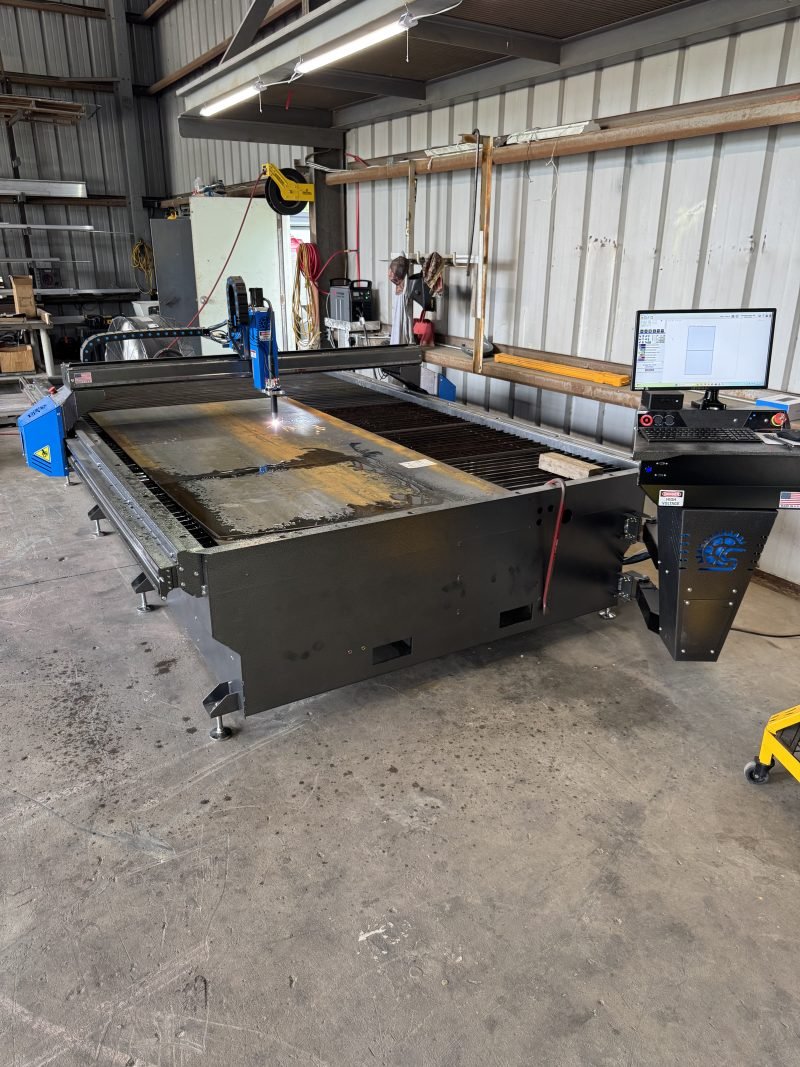
CNC stands for computer numerical control. A plasma table is a flat bed of slats that the sheet lies on, with a gantry that rides along its length and a carriage on the gantry that rides across. The torch hangs from the carriage, so between the two motions it can reach any point on the sheet. A computer reads a cut file, converts the outlines into tool paths and drives the motors along them, firing the torch on and off as it goes.
Two refinements make the difference between a rough cut and a good one. Torch height control keeps the tip at the right distance above the sheet by watching the arc voltage, so it follows plate that is not perfectly flat. Pierce control lifts the torch slightly when it first punches through the metal, so the spray of molten metal at the start of a cut does not ruin the nozzle. Cut speed, amperage and gas pressure are set from a chart for the material and thickness, and the table runs the whole nest of parts without the operator touching the torch.
Underneath, a water tray or a downdraft system catches sparks, smoke and the dross blown out of the cut. Cutting over water also keeps the sheet cooler and reduces warping on thin material.
Materials and thickness in general terms
Plasma cuts carbon steel best. The air plasma systems common in fabrication shops cut mild steel cleanly from thin sheet through plate about an inch thick, and can sever thicker plate with a rougher edge. The exact limit depends on the amperage of the machine, and a shop will tell you where its own system is comfortable.
Stainless steel and aluminum cut as well, with some differences. Both conduct heat differently from mild steel, so the edge tends to carry more dross and the bevel can be a little larger. Aluminum in particular leaves a soft, sticky dross on the bottom edge that has to be scraped or ground off. Stainless cut with air plasma gets a dark, oxidized edge that is cleaned up before welding or finishing. Neither is a problem for structural parts, brackets and blanks; both are worth knowing about if the cut edge will be visible.
For very thin sheet, plasma can still cut, but the heat affected zone is a larger share of the part and warping is more likely. Very thin cosmetic work is where laser cutting, covered below, often takes over.
Kerf, edge quality, bevel and dross
Kerf
The kerf is the width of the slot the plasma jet removes, roughly a sixteenth to an eighth of an inch depending on the amperage and the nozzle. The CNC software offsets the tool path by half the kerf so the finished part comes out the size on the drawing: the torch runs just outside the outline on the part and just inside on holes. The shop handles this; you draw the part at its finished size.
Edge quality and bevel
A plasma edge is smooth and slightly angled rather than perfectly square, usually a few degrees of bevel, because the jet is wider at the top of the cut than the bottom. On thin material it is barely noticeable; on thick plate it can be visible on one side of the part. Where a square edge matters, the shop can orient the part so the bevel falls on the side that does not, or size the part for a cleanup pass on a grinder.
Heat affected zone
The metal just beside the cut gets hot enough to change its structure in a narrow band. On carbon steel the edge can be a little harder than the plate, and air plasma can leave a thin nitrogen-rich layer that occasionally causes porosity in a weld made right on the cut edge. For most work a quick grind of the edge before welding takes care of it.
Dross
Dross is the resolidified metal that clings to the bottom edge of a cut. Cutting too slowly leaves heavy, bubbly dross that knocks off easily; cutting too fast leaves a thin, hard bead that has to be ground. A properly tuned table on clean plate leaves very little, and what remains is removed in finishing.
Holes, small features and tolerances
Holes are where plasma shows its limits. A hole smaller than about the thickness of the plate tends to come out tapered and slightly out of round, because the torch cannot settle into a clean arc before it is already turning. Shops get around this in a few ways: cutting holes a bit undersize and drilling them to size, cutting a pilot and drilling, or on bolt holes that only need clearance, cutting them a little oversize and accepting the taper. Holes that will be tapped for threads should always be drilled, not plasma cut.
Fine features follow the same rule. Narrow slots, sharp inside corners and thin fingers of metal heat up and distort, so good cut files give inside corners a small radius and keep details to a size the kerf can handle.
Tolerances in plain words
A well maintained CNC plasma table holds outline dimensions within a small fraction of an inch, in the range of a thirty-second to a sixteenth depending on thickness, with holes a little looser than outlines. That is more than enough for brackets, gussets, base plates, flanges, blanks for bending and most structural work, and for anything with clearance holes. It is not enough for press-fit holes, machined fits or precise gear-like profiles, and those are drilled, machined or cut another way. If a dimension on your part is tight, mark it, and the shop will plan a drill or a cleanup pass for that feature.
Nesting: how parts are laid out on the sheet
Nesting is arranging parts on a sheet so as little material as possible goes to scrap. The software or the operator rotates and fits parts together, keeps a small web of metal between them so the sheet stays stable, and sequences the cuts so that parts already cut free do not tip up into the torch. Good nesting can be the difference between one sheet and two on a batch of parts, and it is one reason quantity lowers the per-piece price: more parts of different shapes fit the sheet more tightly.
Nesting also considers grain direction for parts that will be bent, as the press brake guide explains, and keeps parts that will be welded together on the same sheet so the material matches. Leftover drops are kept and used for small jobs, which is why a shop may be able to cut a single bracket without charging for a whole sheet.
DXF, DWG and what makes a file cut-ready
The plasma table wants a 2D vector file: lines and arcs that describe the outline of each part. DXF is the standard exchange format and almost every drawing program can export it. DWG, the native AutoCAD format, works as well. What makes either one cut-ready is less about the format and more about what is in it:
- Full size, in inches (or clearly marked metric). A drawing exported at a plot scale cuts at the wrong size.
- Closed outlines. Every part is one continuous loop; every hole is its own closed loop. Gaps, overlapping lines and duplicated lines confuse the path software.
- One part, one view. No side views, dimensions, title blocks, hatching or notes on the cut layer. Put those on a separate layer or in a PDF alongside.
- No text as text. Letters to be cut have to be converted to outlines, and a stencil font if the inside of letters like O and A are to stay attached.
- Inside corners with a small radius where the design allows, and holes sized with the plasma limits in mind.
If you send a 3D model in STEP or a native CAD format, the shop can flatten the parts and export its own DXF, which is often the cleanest route for bent parts because the flat pattern is generated with the shop's own bend settings.
Converting PDFs and sketches
Many jobs arrive as a PDF, a photo or a hand sketch, and all of them can become cut files; they just take a step in between. A PDF exported from CAD still contains vector lines and can often be converted to DXF with cleanup. A scanned drawing or a photo is a picture made of pixels, and the outline has to be traced or redrawn before it can be cut. Automatic tracing works on simple shapes and large lettering but produces wobbly, jagged paths on anything with straight edges and round holes, so a fabricator will usually redraw the part from the dimensions instead.
Redrawing is routine and usually quick for brackets, plates and gussets. It is more work for ornamental pieces, signs and logos with complex curves, and the time goes into the quote. Whatever you send, make sure the dimensions are on it, because a traced outline with no numbers has no scale, and a part that is one percent off the size you needed is still the wrong part. The guide on what to send for a quote lists the details that make this step fast.
When laser or waterjet is the better choice
Plasma is the fast, low cost way to cut steel plate and medium sheet, and for the parts most fabrication shops make it is the right tool. Two other processes exist for the jobs it does not do well, and an honest shop will say when one of them fits better.
Laser cutting uses a focused beam instead of a plasma jet. The kerf is far narrower, the edge is nearly square, small holes come out round, and fine detail in thin sheet is clean. Laser is the choice for thin stainless and aluminum parts with a cosmetic edge, intricate patterns, small precise holes and tight tolerance sheet metal. It costs more per part on simple plate work and is limited on thick material.
Waterjet cutting uses a jet of water carrying abrasive grit. It makes no heat, so there is no heat affected zone, no hardening and no warping, and it cuts materials plasma cannot: thick aluminum with a clean edge, stacked sheets, hardened steel, stone, glass, rubber and plastic. It is slow and expensive by comparison and is chosen when heat or material rules out plasma.
H&L Fabrication cuts on a CNC plasma table. When a part calls for laser or waterjet, the shop will tell you so you can source that cut and still have the forming, welding and finishing done in Lafayette.
Finishing after the cut, and what to send
A part straight off the plasma table has dross on the bottom edge, a sharp top edge, a bit of spatter around the pierce points and possibly a dark oxide line along the cut. Finishing takes care of that in steps that match what the part is for:
- Dross removal and deburring with a grinder, flap disc or deburring tool, so edges are clean and safe to handle.
- Drilling, reaming and tapping any holes that need to be truer than plasma cuts them.
- Edge grinding on faces that will be welded, to remove the hardened layer and oxide.
- Forming on the press brake for parts with bends, and welding for assemblies, as described on the custom metal fabrication page.
- Coating: primer, paint or powder coat on carbon steel, brushing or passivation on stainless, mill or brushed finish on aluminum.
To get a plasma job quoted, send the cut file or a dimensioned drawing, the material and thickness, the quantity, and a note on which edges or holes matter. If the parts will be bent or welded afterward, say so, because that changes the nest, the hole sizes and the finishing. Send your drawing or photos through the quote form and H&L Fabrication in Lafayette will come back with questions or a price.